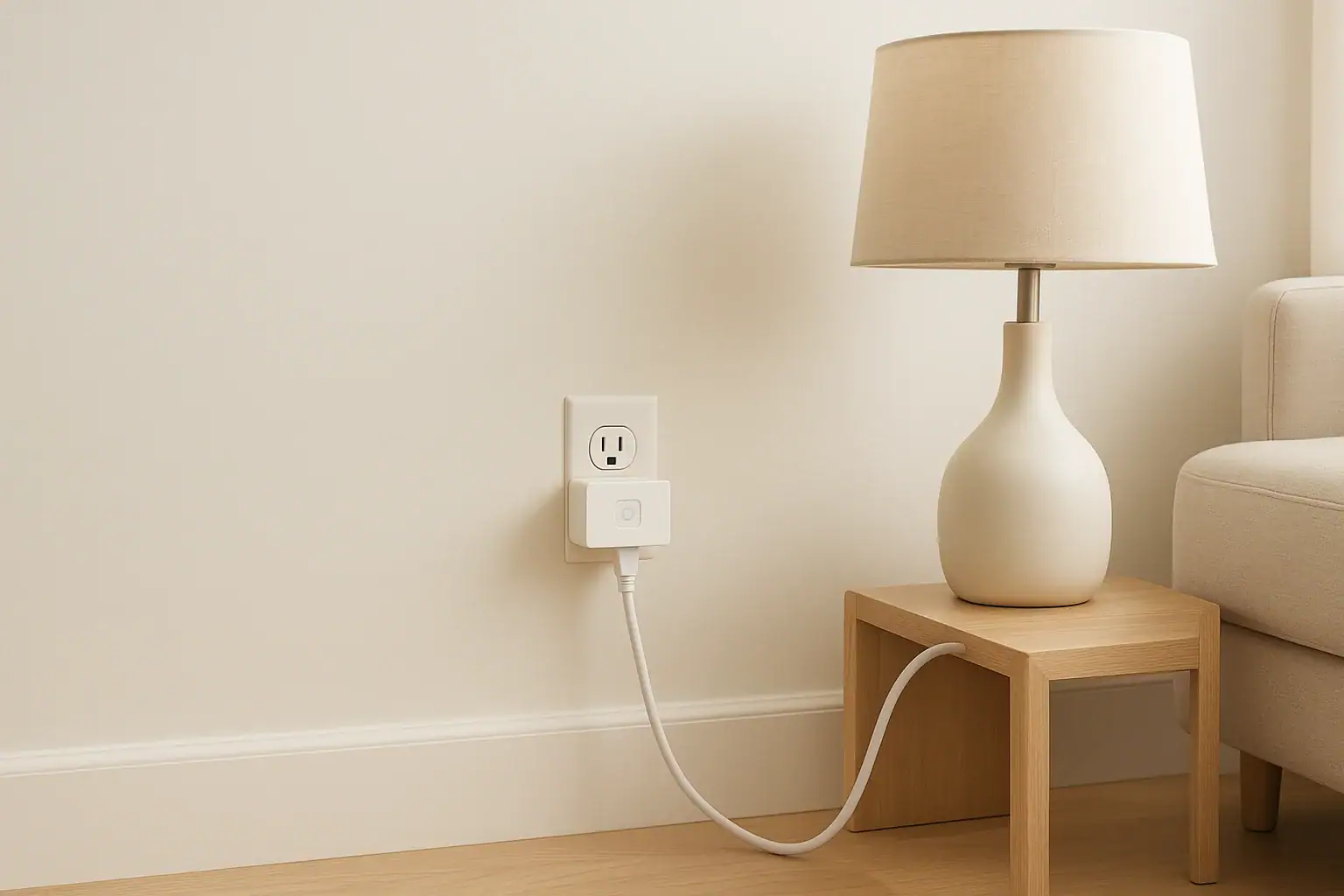
Smart plugs make it easy to automate lamps, small appliances, and other everyday devices. With a tap on your phone or a simple schedule, you can turn things on and off even when you are not at home. But like any electrical device, smart plugs must be used correctly to stay safe. Misusing them can lead to overheating, tripped breakers, or in the worst case, an electrical fire.
This guide walks through practical smart plug safety rules, common mistakes many people make, and how to avoid them. You will learn what you can safely plug in, how to read ratings, where to place smart plugs, and how to use schedules and automations without creating risks. Whether you are setting up your first smart plug or expanding a growing smart home, these tips will help you stay safe and confident.
How Smart Plugs Work and Why Safety Matters
Understanding what a smart plug does makes the safety rules easier to follow. A smart plug is an adapter that sits between your wall outlet and a device. It can:
- Turn power on or off to the connected device
- Follow schedules or timers you set in an app
- Respond to scenes or automations with other smart devices
- Sometimes track energy use or runtime
Inside the plug is a small relay and electronics that control the flow of electricity. If the plug is overloaded, used in the wrong environment, or covered so it cannot cool properly, it can overheat. Because smart plugs are often used on autopilot, problems can go unnoticed until something fails.
That is why it is important to match the plug to the right devices, follow basic electrical safety rules, and avoid common shortcuts that seem convenient but are not safe.
Rule 1: Always Check the Power Rating Before You Plug In
Every smart plug has a maximum load rating, usually listed in amps (A) and watts (W). Exceeding that rating is one of the most serious and common mistakes.
How to find and understand the rating
Look on the body of the plug or its packaging for something like:
- Input: 120 V ~ 60 Hz
- Max load: 10 A or 15 A
- Max power: up to a certain number of watts
Most indoor smart plugs in the US are rated for 10–15 amps at 120 volts. That is fine for many household items, but not all.
Devices that are usually safe to control with a smart plug
- Table and floor lamps
- String lights and decorative lighting
- Small fans
- Phone chargers and small power adapters
- Small electronics like radios or speakers
- Low-wattage holiday decorations
Devices that may be unsafe or not recommended
Many high-power or heat-producing appliances should not be used with a standard smart plug, including:
- Space heaters
- Portable air conditioners
- Microwaves and toaster ovens
- Air fryers and deep fryers
- Coffee makers and kettles with high wattage
- Clothes irons
- Hair dryers and hot styling tools
- Vacuum cleaners and shop tools
These devices can draw a lot of current, especially when they first turn on. Even if they work at first, they may overload the plug over time.
Simple rule of thumb
If a device gets very hot, has a heating element, or uses a motor that feels powerful, treat it with extra caution. Check its wattage label and compare it to the smart plug rating. When in doubt, do not use a smart plug with it.
Rule 2: Avoid Daisy-Chaining and Overloading Outlets
Another common mistake is stacking multiple adapters together. This can create unstable connections and increase the risk of overheating.
What to avoid
- Plugging a smart plug into a power strip, then adding another power strip or multi-plug adapter
- Plugging a power strip into a smart plug and filling every outlet with high-wattage devices
- Stacking a smart plug on top of another plug-in device so it is loose or half hanging out
Safer ways to connect multiple devices
If you need to control several low-power items together, such as holiday lights or a few lamps, you can:
- Use a smart plug with a clearly rated power strip, staying well under the total load limit
- Group similar low-wattage devices only (for example, just lamps or just string lights)
- Skip the smart plug and use a smart power strip designed for multiple outlets if you need individual control
Always keep the combined wattage of everything plugged into a smart plug below its maximum rating, and below the rating of the wall outlet and circuit.
Rule 3: Use the Right Smart Plug for Indoor or Outdoor Use
Moisture and electricity are a dangerous combination. Using an indoor-only smart plug outside, in a damp basement, or near a sink is a serious safety risk.
Indoor vs. outdoor smart plugs
- Indoor plugs: Designed for dry, climate-controlled spaces. Use them in living rooms, bedrooms, offices, and other dry areas.
- Outdoor plugs: Built with weather-resistant housings and seals. Use them for patios, gardens, outdoor lighting, and holiday decorations.
Places to be extra careful
- Bathrooms and laundry rooms
- Kitchens near sinks or dishwashers
- Garages and unfinished basements
- Covered porches that can still get damp
In these areas, keep plugs away from splashes and puddles, and use outlets protected by ground-fault circuit interrupters (GFCI) where required.
Rule 4: Keep Smart Plugs Ventilated and Accessible
Smart plugs generate a small amount of heat during normal use. They need air around them to stay cool and safe.
Do not cover or hide smart plugs
A common mistake is hiding a smart plug behind furniture or inside a tight cabinet. This can trap heat and make it hard to see if something is wrong.
Try to avoid:
- Stuffing plugs behind couches or beds where air cannot circulate
- Covering plugs with curtains, rugs, or fabric
- Sealing them inside closed cabinets with no airflow
Keep them reachable
Make sure you can quickly reach the smart plug to unplug it if needed. This is especially important for devices that run while you sleep or when you are away.
Rule 5: Use Smart Plugs Responsibly With Heat-Producing Devices
Even when a smart plug can technically handle the load, using it with anything that gets very hot deserves extra caution.
Risks with heaters and cooking appliances
Automatically turning on a heater or cooking device when you are not nearby can be dangerous. For example:
- A space heater could turn on near curtains or bedding.
- A cooking appliance could be left with food or paper items nearby.
- A device with a manual switch might stay on after a power outage, then restart unexpectedly.
Safer practices
- Do not use smart plugs to turn on heaters or cooking devices while you are away or asleep.
- Use them only to turn those devices off as a backup, not to turn them on.
- Never leave flammable items near any device controlled by a smart plug.
When in doubt, keep smart plugs for lighting and low-risk electronics, not for anything that can easily start a fire.
Rule 6: Set Safe Schedules, Timers, and Automations
Schedules and automations are what make smart plugs convenient, but they can also create risks if they are poorly planned.
Tips for safe scheduling
- Use schedules for lights, not heaters. Timers are great for lamps and decorative lighting to make your home look occupied.
- Avoid long, continuous runtimes. Give devices a break, especially if they get warm during use.
- Double-check time zones and vacation modes. Make sure automations run when you expect them to.
- Review automations after changes. If you move a plug to a new device, update or delete old schedules tied to it.
Use away modes carefully
Many people use smart plugs to turn lights on and off randomly while traveling. This is generally safe if you:
- Only control low-risk devices like lamps
- Keep bulbs and fixtures in good condition
- Make sure nothing flammable is touching the lamp or shade
Rule 7: Keep Firmware and Apps Updated
Smart plugs are small computers. Outdated software can cause glitches, connection problems, or security weaknesses.
Why updates matter
- Fix bugs that might cause a plug to stop responding correctly
- Improve energy reporting and scheduling reliability
- Patch security issues that could expose your home network
Good update habits
- Check the companion app occasionally for firmware updates
- Allow automatic updates if the app offers them
- Update your phone or tablet app so you have the latest features and fixes
Reliable software helps ensure that your smart plugs follow your commands exactly, especially when turning devices off for safety.
Common Smart Plug Mistakes and How to Avoid Them
Many safety problems come from the same set of simple mistakes. Recognizing them makes it easier to avoid trouble.
Mistake 1: Treating smart plugs like heavy-duty switches
People sometimes assume a smart plug can handle anything that fits into it. In reality, most are meant for light to moderate loads only.
How to avoid it: Always compare the device wattage to the plug rating. Use separate circuits or dedicated outlets for heavy appliances.
Mistake 2: Ignoring signs of heat or damage
Warmth is normal, but excessive heat is not. Warning signs include:
- A plug that is hot to the touch instead of just warm
- Discoloration, melting, or a burning smell
- Crackling sounds or flickering lights
How to avoid it: Unplug the device immediately if you notice any of these signs. Replace damaged plugs and have the outlet checked if needed.
Mistake 3: Using smart plugs on loose or damaged outlets
A smart plug is only as safe as the outlet it is connected to. Loose outlets can spark or overheat.
How to avoid it: If an outlet feels loose, wobbly, or does not hold plugs firmly, stop using it until it is repaired by a qualified person.
Mistake 4: Forgetting what is plugged in
It is easy to move a smart plug from one room to another and forget to update the app name or automations.
How to avoid it:
- Rename each smart plug clearly in the app (for example, “Living Room Lamp” or “Office Fan”).
- Review schedules whenever you move a plug to a new device.
Mistake 5: Relying on smart plugs as the only safety measure
Smart plugs can add convenience, but they are not a replacement for basic safety habits.
How to avoid it:
- Keep smoke and carbon monoxide alarms in working order.
- Do not leave candles, cooking, or open flames unattended.
- Use surge protection where appropriate for sensitive electronics.
Smart Plug Safety Checklist for Your Home
Use this quick checklist to review your smart plug setup and make sure it follows basic safety guidelines.
- I have checked the wattage and amp rating of each smart plug.
- I only control low to moderate power devices with standard smart plugs.
- I am not using smart plugs with space heaters or major cooking appliances.
- No smart plug is hidden under fabric, behind tightly pressed furniture, or inside a sealed cabinet.
- I am not stacking multiple adapters or power strips in unsafe ways.
- Indoor plugs are only used in dry locations; outdoor plugs are used where moisture is possible.
- All plugs and outlets are in good condition, with no cracks, burn marks, or loose connections.
- Schedules and automations are set only for appropriate devices, mainly lighting and low-risk electronics.
- My smart home apps and smart plug firmware are kept up to date.
When to Unplug and Replace a Smart Plug
Smart plugs are inexpensive compared to the cost of repairing fire or electrical damage. If you are unsure about a plug, it is safer to replace it.
Consider unplugging and replacing a smart plug if you notice:
- Cracks, chips, or loose parts on the casing
- Burn marks or discoloration around the prongs or outlet
- Frequent disconnects, random reboots, or unreliable switching
- A strong plastic or burning smell when it is in use
- Heat that is uncomfortable to touch, even with a low-power device
If an outlet or breaker trips repeatedly when using a smart plug, stop using that plug and have the circuit inspected by a qualified person.
Making Smart Plugs a Safe Part of Your Smart Home
Smart plugs can be a safe, helpful part of your connected home when you use them within their limits. Focus on low-risk uses such as lamps, fans, and small electronics. Avoid high-heat and high-power devices, keep plugs ventilated and visible, and use schedules thoughtfully.
By following basic electrical safety rules, checking ratings, and avoiding common mistakes, you can enjoy the convenience of smart control without adding unnecessary risk. If you are ever unsure whether a device is safe to connect, choose caution and plug it directly into a standard outlet instead.
For more ways to make your home both smarter and safer, explore additional smart home safety guides and review your setup room by room. A little planning now can prevent big problems later.
 GFCI Outlet Will Not Reset: Simple Checks and When to Call Help
 Router Placement at Home for Better WiFi Without Extra Devices
 Smart Thermostat Blank After Power Outage: What To Check