Smart locks make it easy to manage who can enter your home, track activity, and avoid fumbling for keys. But every electronic lock depends on power, and eventually the batteries will die. If you do not plan ahead, you could find yourself locked out at the worst possible time. This guide walks you through how to prepare for a dead smart lock battery, what to do if it already happened, and how to build a backup access plan that keeps your home secure and your family safe.
You will learn the typical warning signs of a low battery, step-by-step troubleshooting for a lock that will not respond, and multiple backup options, from hidden keys to portable power banks. The goal is not just to fix a one-time problem, but to design a simple, repeatable routine so a dead battery never turns into an emergency again.
Why Smart Lock Batteries Fail at the Worst Time
Most smart locks are designed to run for months or even a year on a set of batteries. Still, real-world conditions can drain them faster than expected. Understanding why batteries die helps you choose better backup strategies.
Common reasons batteries drain quickly
- Frequent use: A busy household with many entries per day uses more power than a single-person home.
- Extreme temperatures: Very hot or cold weather can reduce battery performance and shorten life.
- Heavy motor load: A door that is misaligned or hard to latch forces the lock motor to work harder, using more power.
- Weak or mixed batteries: Using low-quality batteries or mixing old and new ones can cause early failure.
- Extra features: Constant wireless connections, auto-lock, and frequent remote access can increase power usage.
Even if you manage your batteries well, you should assume they will eventually die at an inconvenient time. That is why a backup access plan is essential for any smart home and safety setup.
Early Warning Signs Your Smart Lock Battery Is Low
Most smart locks give you several clues before the battery is completely dead. Paying attention to these signs allows you to act before you get locked out.
Typical low-battery indicators
- Dim or flashing lights: Indicator lights that flash red, blink in a low-battery pattern, or appear dimmer than usual.
- Beeping or chimes: Repeated beeps or tones after locking or unlocking that are different from the normal sound.
- Slower operation: The deadbolt moves more slowly, or the lock struggles to complete the locking cycle.
- App notifications: Many locks send low-battery alerts to your phone or email if you have the feature enabled.
- Reduced wireless range: Remote commands become less reliable or take longer to respond.
If you notice any of these warning signs, replace the batteries as soon as possible and review your backup access options before the lock stops working entirely.
Immediate Steps When Your Smart Lock Battery Is Dead
If you are already facing a dead battery and cannot get in, stay calm. There are several troubleshooting steps you can try, depending on how your lock is set up and what backup options you have prepared.
1. Check for a physical key override
Many smart locks still include a standard key cylinder hidden behind a cover or integrated into the hardware. If you have a physical key, this is often the fastest way to regain access.
- Look for a small removable cover on the exterior side of the lock.
- Use a flat, non-damaging tool or your fingernail to gently remove the cover if present.
- Insert your key, unlock the door, and then address the dead batteries from the inside.
If you cannot find a keyhole or no key was provided, move on to the next options.
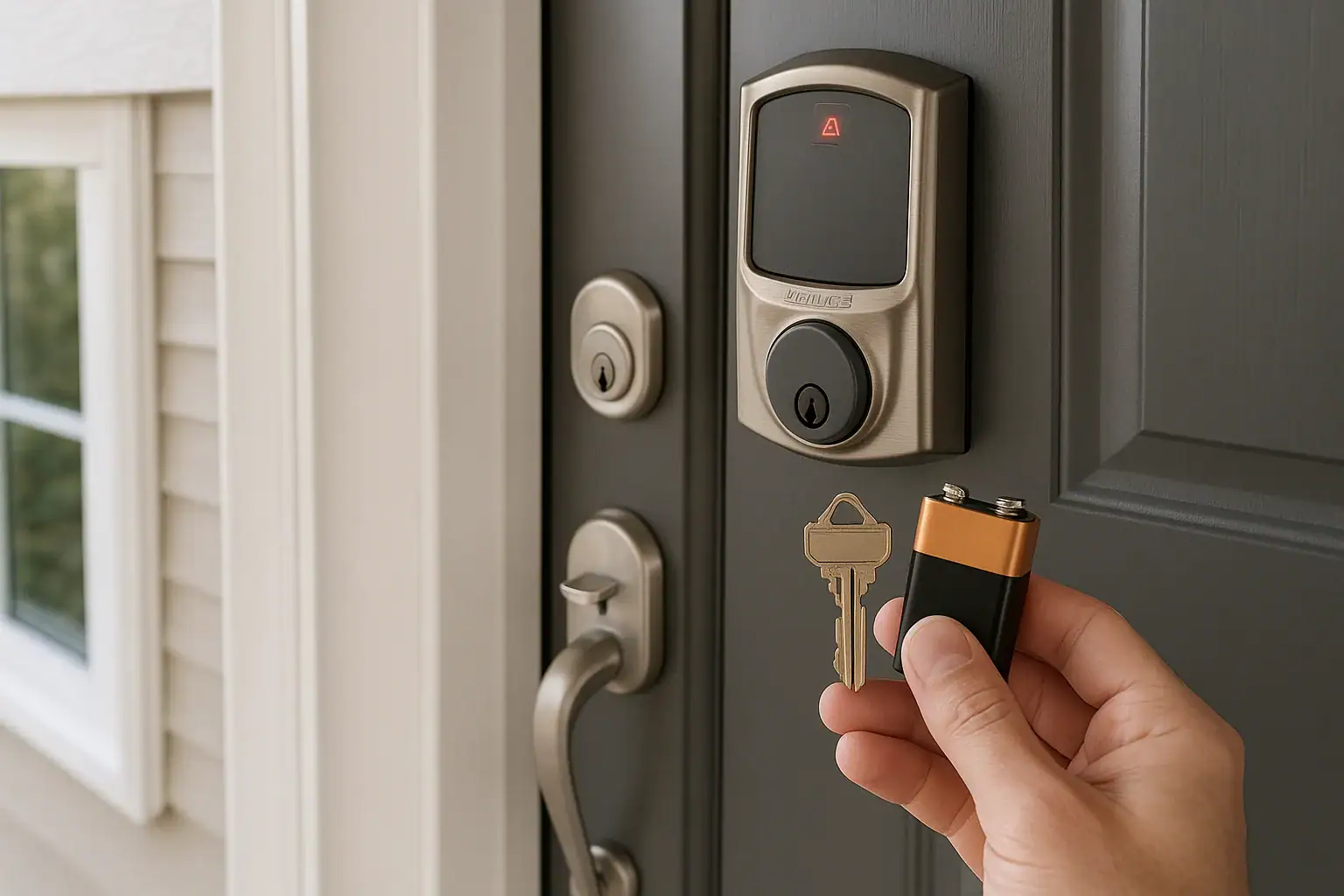
2. Look for an external power port
Some smart locks provide a way to temporarily power the lock from the outside so you can enter a code or use a credential even when the main batteries are dead.
- Check the bottom or side of the lock for small metal contacts or a port.
- These may be designed for a 9-volt battery or a small cable from a portable power source.
- Hold the battery or connector in place firmly and wait a few seconds for the lock to power up.
- Enter your code or use your usual method to unlock the door.
Once inside, replace the internal batteries immediately so you do not need to rely on temporary power again.
3. Try another entry point
If your main entry is blocked by a dead smart lock, another door or window may still use a traditional lock.
- Check the back door, garage entry, or side door for mechanical locks you can open with a key.
- If you have a connected garage door, use a remote or wall control if available.
- Once inside, you can open the smart-locked door from the interior and replace the batteries.
4. Use your backup person or lockout plan
If you have already shared a key or access method with a trusted person, now is the time to use it.
- Call or text your designated backup contact who holds a physical key.
- If you have a hidden mechanical key stored in a secure location, retrieve it.
- If you are renting, contact your property manager or maintenance line.
5. As a last resort, contact a locksmith
If you have no backup key, no external power option, and no alternate entry, a professional locksmith may be necessary. Ask about non-destructive entry methods first to avoid damage to your door and hardware.
Building a Smart Lock Backup Access Plan
Once you have regained access or before a problem occurs, invest a little time in designing a simple backup plan. A good plan balances convenience, security, and cost so you are never fully dependent on one device or power source.
1. Always maintain a physical backup key
Even in a smart home, a traditional key is still one of the most reliable backup tools.
- Keep at least two copies: One for daily use (if needed) and one stored securely as a backup.
- Store away from the door: Avoid hiding keys under doormats, flowerpots, or obvious spots.
- Use a locking key box: Consider a wall-mounted or rail-mounted key safe with a code, placed in a discreet location.
- Share with a trusted person: Give a spare key to a nearby family member, close friend, or neighbor you trust.
2. Add a mechanical backup entry
Relying on a single smart lock for every entrance increases your risk. Consider keeping at least one door with a traditional lock.
- Designate a side or back door as your mechanical backup entry.
- Ensure it has a high-quality deadbolt and is locked consistently for security.
- Store the key in a safe but accessible place, such as a locking key box.
3. Prepare an external power option
If your smart lock supports temporary external power, make it easy to use in an emergency.
- Keep a fresh 9-volt battery or compatible power bank in your car, bag, or garage.
- Label it clearly so family members know it is for the front door lock.
- Practice using the external power feature once while the lock is still working so you understand the process.
4. Document your access methods
In an emergency, you do not want to rely on memory. A simple written or digital record helps you and your household stay prepared.
- List all entry points and note which are smart locks and which are mechanical.
- Record where spare keys are stored and who has copies.
- Include instructions for using external power or backup codes.
- Share this information with adults and responsible teens in the home.
Smart Lock Battery Maintenance and Replacement Tips
A strong backup plan is important, but regular maintenance can greatly reduce how often you need to use it. Simple habits can extend battery life and improve reliability.
1. Use the right type of batteries
Most smart locks are designed for specific battery types. Using the wrong type can cause shorter life or inconsistent performance.
- Check your lock manual or manufacturer website for the recommended type and size.
- Avoid mixing old and new batteries in the same lock.
- Do not use rechargeable batteries unless they are specifically recommended for your device.
2. Set a battery replacement schedule
Instead of waiting for low-battery warnings, replace batteries on a predictable schedule.
- Choose a recurring date, such as every 6 or 12 months.
- Align replacement with other home maintenance tasks, like smoke detector checks.
- Keep a small supply of fresh batteries in a cool, dry place.
3. Keep the door and latch aligned
A misaligned door can force the lock motor to work harder, draining batteries faster.
- Check that the deadbolt slides smoothly when the door is open.
- If it sticks when closed, adjust the strike plate or hinges.
- Consider weatherstripping adjustments if the door is hard to close in certain seasons.
4. Reduce unnecessary power usage
Some smart features are convenient but can use extra power.
- Review your settings for auto-lock timing, remote access, and constant status updates.
- Increase auto-lock delay slightly if the door is used very frequently.
- Disable features you do not actually use, such as repeated chimes or lights.
Planning for Family, Guests, and Emergencies
A smart lock access plan should cover more than just you. Think about how family members, guests, and emergency situations fit into your strategy.
1. Make sure everyone knows the backup plan
Even the best plan fails if only one person knows it. Walk through the basics with your household.
- Show family members where backup keys are stored and how to use them.
- Explain how to recognize low-battery warnings and who to tell.
- Practice using an external power option together if your lock supports it.
2. Guest and pet sitter access
When you share smart lock access with guests or pet sitters, consider what happens if the battery fails while you are away.
- Provide a mechanical key in a secure key box as a backup to digital codes.
- Leave clear written instructions for what to do if the smart lock stops working.
- Make sure you can be reached by phone or text in case of an issue.
3. Emergency responder considerations
In a true emergency, first responders may need to reach you quickly. While they can force entry if necessary, a thoughtful plan can reduce damage.
- Consider sharing a key with a trusted neighbor who is often home.
- For multi-unit buildings, confirm how property management handles emergency access.
- Ensure that at least one entry is not fully dependent on smart technology.
Balancing Security and Convenience
It can be tempting to hide a key in an easy spot or share codes widely to avoid lockouts, but that can create serious security risks. A good backup access plan keeps you from being locked out without making it easier for someone else to get in.
Safer alternatives to common risky habits
- Instead of: Hiding a key under the doormat
Try: A locking key box mounted in a discreet location. - Instead of: Sharing one code with everyone
Try: Individual codes for family, guests, and service providers that you can change or remove. - Instead of: Ignoring low-battery warnings
Try: A simple calendar reminder to check and replace batteries regularly.
By combining smart features with simple physical backups, you can enjoy the convenience of keyless entry without sacrificing safety.
Putting It All Together: Your Smart Lock Backup Checklist
Use this quick checklist to build or review your backup access plan so a dead smart lock battery never leaves you stranded.
- I have at least one physical key for every smart-locked door.
- Spare keys are stored securely in a locking key box or with a trusted person, not in obvious hiding spots.
- At least one entrance to my home has a mechanical lock as a backup.
- I know whether my smart lock supports external power and how to use it.
- I keep the recommended type of fresh batteries on hand.
- I follow a regular schedule to replace smart lock batteries.
- My household members know the backup plan and where to find help.
- I have a plan for guests, pet sitters, and emergencies.
With a little preparation, a dead smart lock battery becomes a minor inconvenience instead of a major disruption. Combine smart technology with thoughtful backup planning, and you can enjoy both convenience and peace of mind every time you lock your door.
For more ways to strengthen your home safety setup and integrate smart devices responsibly, explore additional smart home and safety resources at Signature Home Guide.
 Smart Lock Auto-Lock Settings: Safe Defaults That Prevent Lockouts
 How to Store Important Documents at Home and in the Cloud: A Practical Guide
 Smart Lock Guest Code Audit Checklist