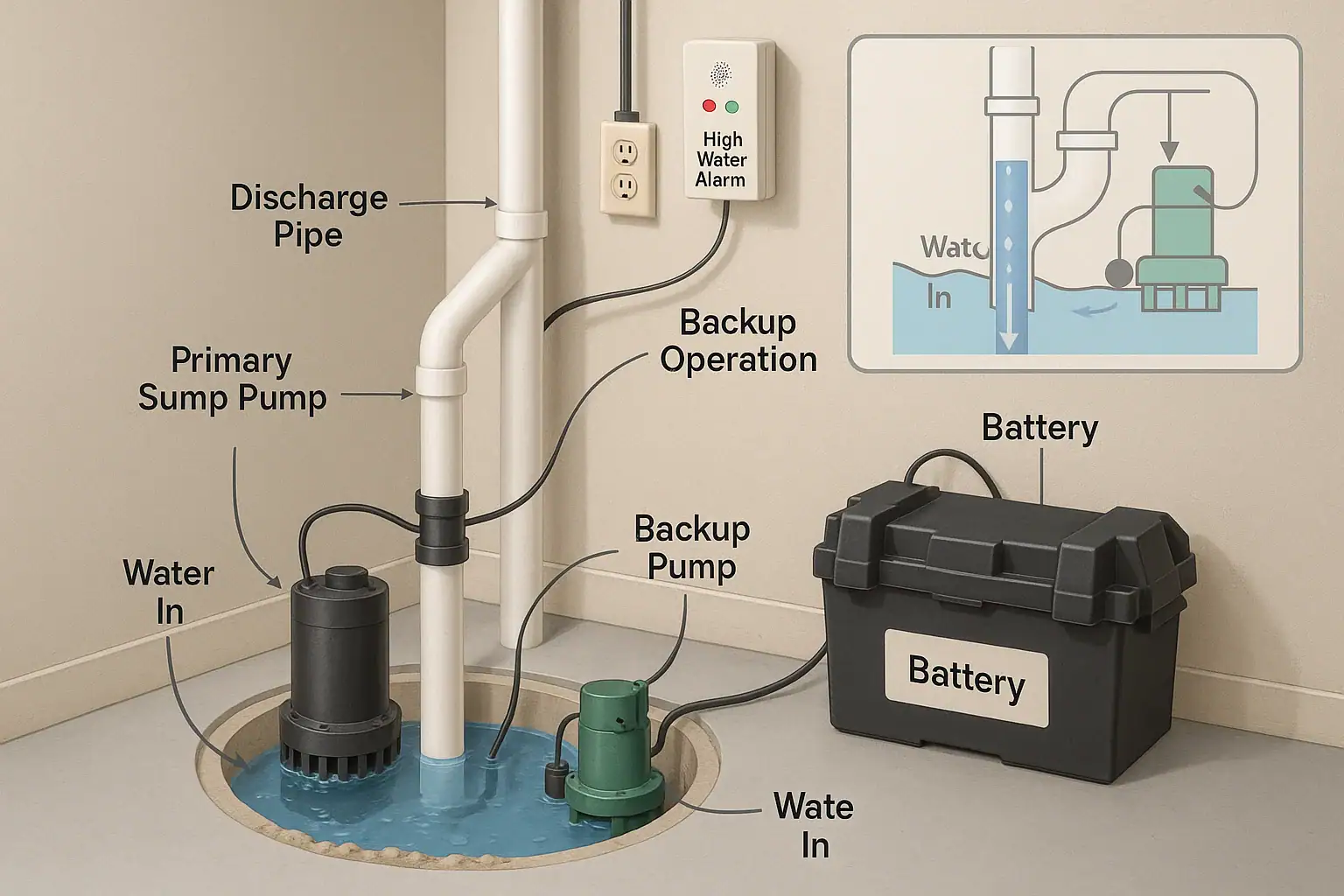
For many homeowners, the sump pump is out of sight and out of mind—until it fails. A flooded basement can damage flooring, furniture, stored items, and even your home’s structure. Adding a sump pump alarm and a battery backup system is one of the most effective ways to protect your home from unexpected water damage, especially during storms and power outages. This guide explains the basics in clear, practical terms so you can make confident decisions, whether you are planning a new installation or upgrading an existing sump pump setup.
Below, you will learn how sump pumps work, why alarms and battery backups matter, what features to look for, and how to size, install, and maintain these systems. The goal is to help you create a reliable, low-maintenance safety net that keeps your basement dry even when you are asleep, away from home, or the power goes out.
Understanding Your Sump Pump System
Before choosing an alarm or battery backup, it helps to understand the basics of how a sump pump system protects your home. Most modern homes with basements or crawlspaces in wet climates include a sump pit and pump as part of the drainage system.
What a Sump Pump Does
A sump pump sits in a pit (or basin) at the lowest point of your basement or crawlspace. Perforated drain tiles or French drains around your foundation channel groundwater into this pit. When the water level rises to a certain point, the pump turns on and pushes water out of the pit and away from your home’s foundation through a discharge pipe.
Without a working sump pump, groundwater or stormwater can rise above the pit and spill into your basement, causing flooding and moisture problems.
Common Ways Sump Pumps Fail
Even a well-installed sump pump can fail or fall behind. Common issues include:
- Power outages: The most obvious problem, especially during heavy storms when you need the pump most.
- Mechanical failure: A worn-out motor, stuck float switch, or clogged impeller can keep the pump from running.
- Overwhelmed capacity: Extreme rainfall can exceed the pump’s ability to keep up, causing the water level to rise.
- Clogged discharge line: Ice, debris, or a crushed pipe can stop water from leaving the pit.
- Human error: A pump unplugged for maintenance and never plugged back in is more common than many people realize.
A sump pump alarm and a battery backup system are designed to address several of these risks and give you time to act before water reaches your floor level.
What Is a Sump Pump Alarm?
A sump pump alarm is a monitoring device that alerts you when something is wrong with your sump pit or pump. Instead of discovering a problem only after water appears on your basement floor, the alarm gives you an early warning so you can investigate or call for help.
How Sump Pump Alarms Work
Most sump pump alarms rely on a sensor that detects water reaching a level higher than normal in the pit. When that happens, the alarm triggers a loud audible alert and, in many modern systems, a notification to your phone.
Common sensor types include:
- Float sensors: A float rises with the water level. When it reaches a preset height, it closes a circuit and sounds the alarm.
- Conductivity or moisture sensors: Probes sense the presence of water at a specific height in the pit or on the floor.
- Pressure sensors: Less common in basic residential setups, these detect water pressure changes in the pit.
Why a Sump Pump Alarm Matters
An alarm is a relatively low-cost addition that can prevent major damage. It is especially valuable if:
- You are away from home frequently or travel often.
- Your basement is finished or used for storage, a home office, or a guest room.
- You live in an area with heavy rainfall, snowmelt, or a high water table.
- Your pump is older or has failed in the past.
By warning you that the water level is rising too high, the alarm gives you a chance to check for a tripped breaker, a stuck float, a blocked discharge line, or a failed pump before water reaches your flooring.
What Is a Sump Pump Battery Backup?
A sump pump battery backup is a secondary power source and often a secondary pump that keeps water moving out of your sump pit when the main pump cannot run. It is your safety net during power outages or primary pump failures.
How Battery Backup Systems Work
Most residential battery backup systems include three core components:
- Backup pump: A separate pump installed in the same pit or in a second pit, ready to run when needed.
- Battery and charger: A deep-cycle battery connected to a charger or controller that keeps it topped off.
- Controller or monitoring unit: The brain of the system that senses power loss, high water levels, or primary pump failure and switches to battery power.
When the power goes out or the main pump fails, the controller turns on the backup pump, which runs off the battery until power is restored or the battery is depleted.
Types of Batteries Used
Battery backup systems typically use one of these battery types:
- Flooded lead-acid (wet cell): Traditional style, usually lower cost but requires periodic water level checks and ventilation.
- Sealed lead-acid (AGM or gel): Low maintenance, spill-resistant, and often longer lasting, but usually more expensive.
- Lithium-based: Newer in this application, lighter and efficient, but higher upfront cost and specific charging needs.
For most homeowners, a sealed lead-acid deep-cycle battery offers a good balance of reliability, maintenance, and cost.
Key Benefits of Sump Pump Alarms and Battery Backups
Adding an alarm and a battery backup system is about more than just peace of mind. It offers practical, measurable benefits for your home and budget.
- Early warning of problems: An alarm alerts you before water reaches the basement floor, giving you time to act.
- Protection during power outages: A battery backup keeps your pump running when storms knock out electricity.
- Redundancy: A second pump means your home is not relying on a single mechanical device.
- Reduced risk of mold and mildew: Preventing water intrusion helps control moisture and indoor air quality.
- Potential insurance benefits: Some insurers view active water protection favorably; check with your provider.
- Higher home appeal: A robust sump system can be a selling point for future buyers, especially in wet regions.
Important Features to Look For
Not all alarms and battery backup systems are the same. When you shop, focus on features that directly affect reliability, ease of use, and long-term performance.
Essential Alarm Features
- Loud audible alert: The siren should be loud enough to hear from main living areas or bedrooms.
- High water level sensor: Adjustable height is helpful so you can set it just above the normal pump-on level.
- Battery backup for the alarm itself: Ensures the alarm works even during power outages.
- Remote alerts: Systems that send notifications to your phone or email can warn you when you are away.
- Indicator lights: Simple status lights for power, alarm, and battery make it easy to check at a glance.
Essential Battery Backup Features
- Adequate pumping capacity: The backup pump should handle a significant portion of your main pump’s capacity. Aim for at least 50 to 75 percent of the main pump’s gallons per hour rating.
- Run time: Look for systems that clearly state how many hours they can run at a given pumping rate.
- Automatic activation: The system should switch on without manual intervention when power is lost or water rises too high.
- Battery health monitoring: Indicators or alerts for low battery, charging status, and battery replacement.
- Corrosion-resistant components: Battery terminals, pump housing, and hardware should hold up in a damp environment.
- Test function: A simple way to test the pump and alarm so you can verify everything works before a storm.
Choosing the Right Size Battery Backup System
Proper sizing is one of the most important steps. An undersized backup may run only briefly or fail to keep up with heavy inflow. Oversizing can add cost without much added benefit.
Step 1: Estimate Your Pumping Needs
Check your existing sump pump for a label listing its gallons per hour (GPH) rating at a specific lift height, often 10 feet. If you cannot find it, you can estimate by:
- Measuring how long your pump runs to empty the pit.
- Estimating the pit’s volume (diameter, depth, and typical water height).
- Calculating how many gallons are pumped per minute and multiplying by 60 for GPH.
Step 2: Decide How Long You Want Coverage
Ask yourself how long power outages typically last in your area. Many homeowners aim for at least 6 to 8 hours of backup at a moderate pumping rate. In areas with frequent or extended outages, 12 to 24 hours of capacity may be worth the investment.
Step 3: Match Battery Capacity
Battery capacity is usually measured in amp-hours (Ah). The higher the amp-hour rating, the longer the potential run time. When comparing systems:
- Look for charts that show run time at different pumping rates.
- Consider using two compatible batteries in parallel if the system supports it and you need longer coverage.
- Remember that batteries lose capacity over time, especially in unconditioned spaces.
Installation Basics and Safety Tips
Many homeowners with basic DIY skills can install or upgrade a sump pump alarm and battery backup system, but there are times when hiring a professional is the safer choice. Always follow local codes and manufacturer instructions.
Installing a Sump Pump Alarm
General steps include:
- Mount the alarm unit: Choose a wall near the sump pit and an outlet, above potential flood level.
- Place the sensor: Attach the float or moisture sensor inside the pit, just above the normal pump-on level.
- Secure the wiring: Route wires neatly along the wall or discharge pipe, keeping them away from moving parts.
- Connect power: Plug the alarm into a grounded outlet or install batteries as directed.
- Test the system: Slowly raise the float or add water to confirm the alarm triggers.
Installing a Battery Backup Pump
Because this involves plumbing and electrical connections, consider a licensed plumber or electrician if you are unsure. Typical steps:
- Position the backup pump: Place it in the sump pit, usually slightly higher than the primary pump so it runs only when needed.
- Add a discharge line: Connect the backup pump to its own discharge pipe or a properly configured shared line with check valves to prevent backflow.
- Install the battery box: Place the battery in a vented, accessible location off the floor and close to the pump.
- Wire the system: Connect the pump, battery, and controller following the wiring diagram carefully.
- Connect to power: Plug the controller into a dedicated outlet, ideally protected by a ground-fault circuit interrupter.
- Test under load: Simulate a high water level by adding water to the pit and, if safe, briefly unplug the main pump to confirm the backup activates.
Always disconnect power before working on wiring, and avoid standing in water while handling electrical components.
Routine Maintenance and Testing
Even the best system needs basic care. A simple maintenance schedule can dramatically increase reliability.
Monthly or After Heavy Storms
- Visually check the sump pit for debris, silt, or objects that could block the pump.
- Listen for unusual noises when the pump runs, such as grinding or rattling.
- Confirm the alarm has power and its status lights look normal.
Quarterly
- Pour water into the pit until the main pump turns on and empties the pit.
- Continue adding water until the alarm triggers, then reset it.
- If safe, briefly disconnect the main pump’s power to confirm the backup pump activates when the water rises.
Annually
- Clean the pit and pump intake to remove silt and buildup.
- Inspect and clean battery terminals, tightening any loose connections.
- Check the battery’s age; many need replacement every 3 to 5 years, depending on type and use.
- Review your alarm and backup documentation so you remember how to interpret status lights and alerts.
Smart Home Integration and Remote Monitoring
Modern sump pump alarms and backup systems can often integrate with smart home platforms, giving you more visibility and control.
Depending on the model and accessories you choose, you may be able to:
- Receive push notifications or text messages when the alarm triggers.
- View pump activity history, including how often the pump runs.
- Monitor battery status from a phone app.
- Connect the alarm to a broader home monitoring system for centralized alerts.
For homeowners who travel or own rental properties, remote monitoring can be especially valuable. If you plan to integrate your sump pump alarm into a smart home system, confirm compatibility and network requirements before purchase.
When to Call a Professional
While many tasks are manageable for a confident do-it-yourselfer, consider hiring a professional if:
- Your basement has a history of severe flooding or complex drainage issues.
- You need to install or reroute discharge lines through walls or above-grade.
- You are uncomfortable working with electrical wiring, outlets, or circuit breakers.
- Local codes require permits or inspections for plumbing or electrical work.
A qualified contractor can help you size the system correctly, comply with local regulations, and ensure that both the primary and backup pumps are installed safely and effectively.
Putting It All Together
Protecting your basement from water damage does not have to be complicated. Start by confirming that your existing sump pump is in good working order and properly sized for your home. Then add a reliable sump pump alarm to warn you of rising water levels and a battery backup system to keep pumping during power outages or mechanical failures.
By combining these layers of protection, performing simple routine maintenance, and considering smart home monitoring options, you can greatly reduce the risk of an unexpected flood. A thoughtful setup today can save you from costly repairs, lost belongings, and the stress of a wet basement tomorrow.
 Garage Freezer High Temperature Alarm Guide
 Security Camera Placement Without Blind Spots: A Practical Homeowner’s Guide
 Smart Lock Battery Dead? How to Create a Reliable Backup Access Plan