Quick answer: Make sure your hands, the floor, and the panel area are dry. Turn off affected lights and unplug accessible devices, then move the tripped breaker fully to OFF and back to ON once. If it will not stay on, trips again, or warning signs are present, leave it off and call an electrician.
Use this limited process when power is out in only part of the home and a standard branch-circuit breaker appears tripped. Do not remove the panel’s secured cover around the breakers (the deadfront), attempt wiring repairs, or use this process where there is a whole-home outage.
Before approaching the panel, make sure your hands, the floor, and the surrounding area are dry. FirstEnergy’s guidance directs customers to use dry hands and stand on a dry floor when checking breakers.
Stop before touching the panel if there is visible moisture near it, exposed wiring, sparks, smoke, or physical damage. The U.S. Consumer Product Safety Commission (CPSC) also identifies frequent resets, unusual sizzling or buzzing, a hot-insulation odor, discoloration, and damaged insulation as electrical warning signs.
How to recognize a tripped breaker
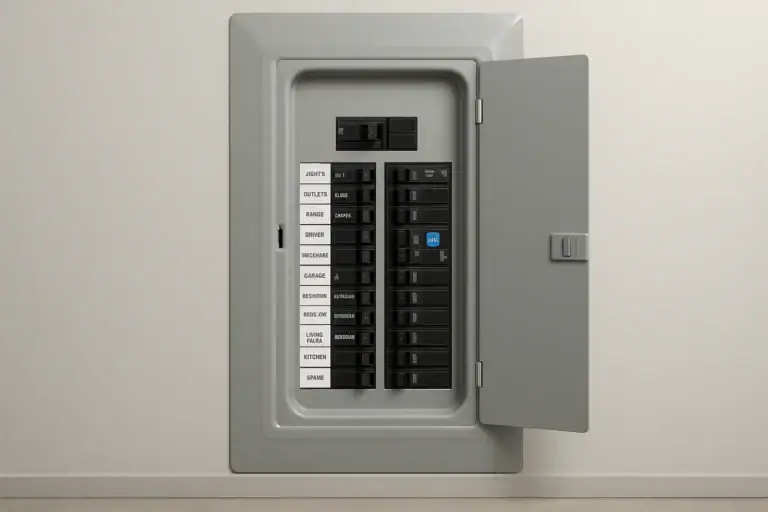
If only some lights or outlets have lost power, look through the panel’s hinged door for a handle that is not aligned with the others. A tripped breaker may be fully OFF or may rest between ON and OFF. CPSC notes that the middle position can be difficult to notice.
If no branch breaker is clearly tripped, do not operate breakers at random. Check the panel directory and the documentation for the specific panel or breaker, or contact an electrician. Some products have indicators or test controls, but their meanings and procedures are model-specific.
What to disconnect first
Turn off light switches in the affected area and unplug accessible plug-in devices that lost power. This follows the approach in Southern California Edison’s breaker-reset guidance, which calls for turning off switches and unplugging appliances before resetting.
Do not reach behind heavy equipment, move a built-in appliance, or touch a wet, damaged, melted, or scorched cord, plug, or receptacle. Leave unsafe or inaccessible equipment alone and seek qualified help.
Step-by-step breaker reset checklist
- Check for stop signs. Confirm the area, floor, and your hands are dry. Do not continue if you notice moisture, damage, smoke, sparks, unusual sounds, or an odor of hot insulation.
- Reduce the load. Turn off affected light switches and unplug accessible devices in the area without handling damaged equipment.
- Open only the hinged panel door. Keep the deadfront secured in place.
- Find the tripped handle. Look for a branch breaker that is OFF or between ON and OFF.
- Move it fully to OFF. A handle in the middle position must be moved all the way to OFF first.
- Move it to ON once. Do not force a handle that does not move normally or try to hold it in place.
- Close the panel door. Check whether power has returned before reconnecting devices.
The full OFF-then-ON motion is described by FirstEnergy and Southern California Edison. CPSC similarly says an intermediate-position breaker should be moved to OFF before it is turned back on. This article uses one reset attempt after disconnecting accessible loads as a conservative homeowner boundary, not as a universal electrical-code rule.
When to stop, reset, or call an electrician
| What you observe | What to do |
|---|---|
| Your hands or the floor are damp, or there is moisture near the panel | Stop. Do not touch or operate the panel. |
| The area is dry, no warning signs are present, and accessible loads are disconnected | Reset once. Move the breaker fully to OFF, then to ON. |
| The breaker remains ON | Reconnect devices one at a time and watch for another loss of power. |
| The handle will not move normally, will not remain ON, or trips again | Leave it OFF and call a qualified electrician. |
| You notice sparks, exposed wiring, damaged insulation, discoloration, unusual buzzing or sizzling, or a hot-insulation odor | Do not reset the breaker or touch damaged equipment. Obtain qualified help. |
| There is smoke or flame | Leave the home and call emergency services from a safe location. |
The warning-sign and repeat-trip guidance in this table is based on CPSC and utility guidance. A breaker that trips again is not, by itself, a reliable diagnosis of the cause; it needs evaluation rather than repeated resetting.
After power returns
Reconnect devices one at a time. If restoring a particular device is followed by another trip, leave the breaker OFF and keep that device unplugged. Do not assume the device or the breaker is definitively at fault, and do not repeatedly reset the breaker.
Do not replace a breaker with a higher-rated one, remove the panel cover, tighten wiring, or attempt internal testing. Those are electrical repairs, not part of a normal handle reset. For broader household safety planning, visit the Smart Home & Safety guide.
 AFCI Breaker Keeps Tripping: How to Track Down the Cause
 GFCI Outlet Will Not Reset: Simple Checks and When to Call Help