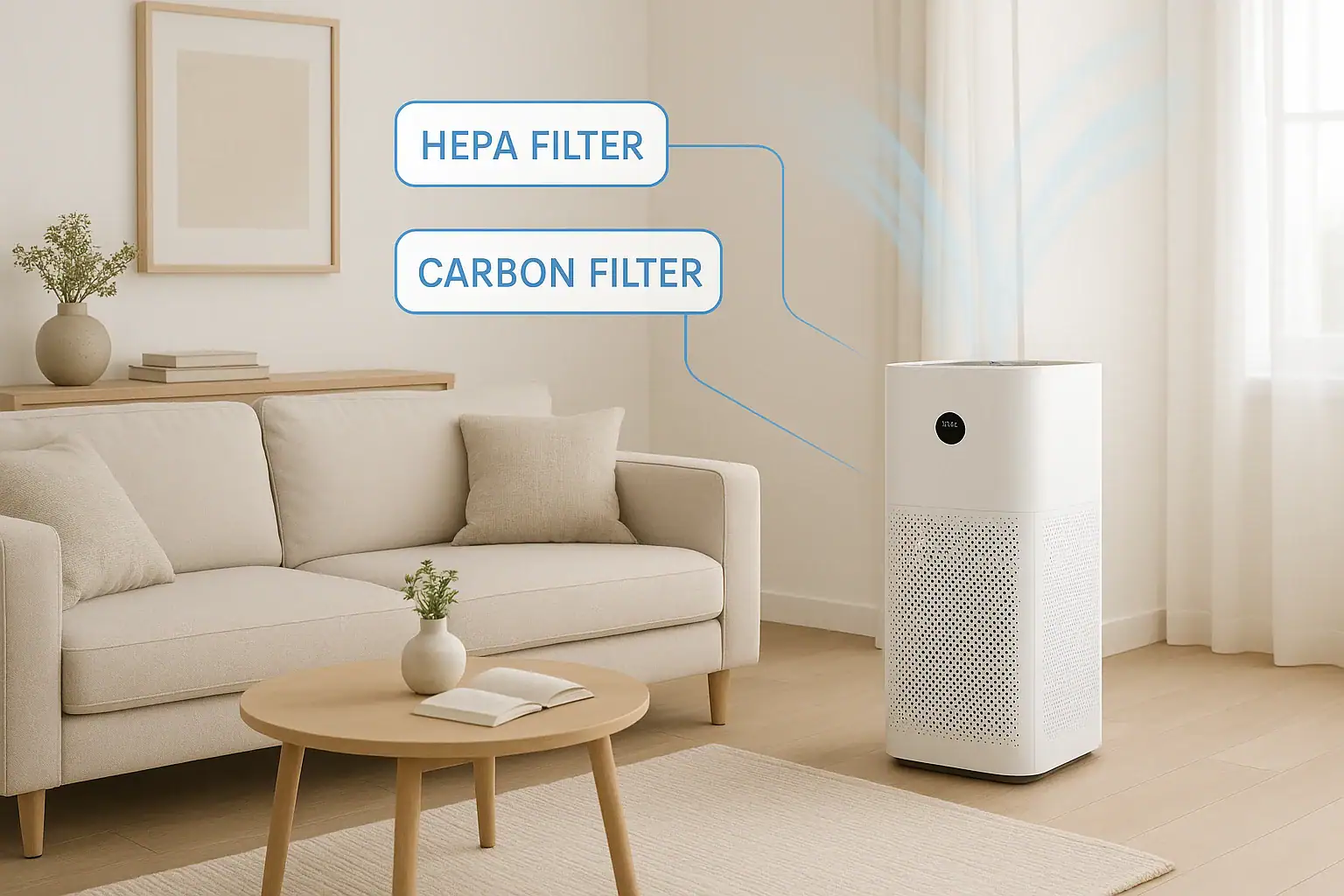
Air purifiers and filtration systems can quietly improve your indoor air, but only if their filters are replaced on time. Many people plug in a purifier, set it to auto, and forget about it for months or even years. By then, filters are often clogged, odors linger, and allergy symptoms creep back. A realistic replacement schedule for HEPA and carbon filters can help you keep your home’s air cleaner without wasting money on changing filters too early.
This guide walks through how HEPA and activated carbon filters work, the typical replacement timelines, and the real-world factors that speed up or slow down wear. You will also find practical checklists, signs your filters are overdue, and tips to stretch filter life without sacrificing air quality. Use it as a reference for purifiers, portable units, and whole-home systems across different rooms and lifestyles.
HEPA vs. Carbon Filters: What Each One Does
Most air cleaners use at least two main stages of filtration: a HEPA filter and an activated carbon filter. They target different types of pollutants, so they age and fail in different ways.
What a HEPA Filter Removes
HEPA (high-efficiency particulate air) filters are designed to capture tiny solid particles in the air. These include:
- Dust and dust mite debris
- Pollen from trees, grasses, and weeds
- Pet dander and hair fragments
- Mold spores
- Smoke particles and soot
- Fine particles from cooking and household activities
HEPA media is usually a dense mat of fibers. As air passes through, particles get trapped. Over time, that mat becomes packed with debris, which increases resistance and reduces airflow. Eventually, your purifier moves less air and captures fewer particles.
What a Carbon Filter Removes
Activated carbon filters target gases and odors, not particles. They help reduce:
- Cooking odors such as garlic, onions, and frying oil
- Pet and litter box smells
- Smoke odors from tobacco, fireplaces, and wildfires
- Household chemical fumes from cleaners, paints, and adhesives
- General musty or stale odors
Carbon filters use a porous material with a large surface area. Gaseous molecules stick to the surface (a process called adsorption). Once the surface is saturated, the filter can no longer absorb odors effectively, even if it still looks clean.
Typical Replacement Timelines for HEPA and Carbon Filters
Every device and filter model is a bit different, but there are reliable ranges you can use as a starting point. Think of these as average schedules in a typical home with light to moderate pollution and regular use.
General HEPA Filter Replacement Schedule
- Portable room air purifiers: Every 9–18 months
- High-use or high-pollution rooms (smoke, pets, heavy dust): Every 6–12 months
- Whole-home systems with HEPA add-ons: Every 12–24 months
If your unit runs 24/7 on higher fan speeds, expect to be closer to the shorter end of these ranges.
General Carbon Filter Replacement Schedule
- Thin carbon pre-filters (often in front of HEPA): Every 2–4 months
- Thicker granular carbon filters: Every 6–12 months
- Heavy smoke or strong odors: Every 3–6 months
Because carbon filters handle gases, they usually saturate faster than HEPA filters in homes with strong odors or smoke. If odor control is your main goal, prioritize timely carbon filter changes.
Real-World Factors That Change Your Filter Schedule
Filter life is not one-size-fits-all. Two homes using the same purifier can have very different replacement needs. Consider these factors and adjust your schedule accordingly.
1. Indoor Air Pollution Level
The more particles or odors your filters face, the faster they wear out.
- High particle load: Nearby construction, unpaved roads, frequent vacuuming without a HEPA vacuum, or open windows in pollen season can all overload HEPA filters.
- High odor or gas load: Regular indoor smoking, frequent frying or grilling, heavy use of scented products, or strong chemical cleaners will saturate carbon filters quickly.
2. Pets in the Home
Pets add hair, dander, and odors that shorten filter life.
- With one low-shedding pet, expect to change HEPA filters about 20–30% more often.
- With multiple shedding pets, you may need to halve the suggested timelines, especially for carbon filters handling odors.
3. Smoking or Fireplace Use
Smoke is one of the toughest challenges for filters.
- Indoor smoking: Plan on replacing carbon filters every 3–4 months and HEPA filters every 6–9 months in the most-used rooms.
- Occasional fireplace use: If your purifier runs during and after fires, check filters monthly in the heating season and expect shorter life.
4. Run Time and Fan Speed
A purifier that runs 24/7 on high speed will push far more air through its filters than one that runs a few hours a day on low. As a rough rule:
- Running continuously on high can cut filter life by 30–50% compared with light, intermittent use.
- Auto modes that slow down when air is cleaner may extend filter life, but you still need to check them regularly.
5. Home Size and Layout
Using a small purifier in a large, open area forces it to work harder. That can shorten filter life because the unit is often running on higher speeds to keep up. In contrast, using a purifier in a smaller, enclosed room can extend filter life, especially if doors are kept mostly closed.
Room-by-Room Filter Replacement Guide
If you use multiple purifiers or filtration units throughout your home, it helps to set different expectations by room. Here is a practical breakdown.
Bedroom
Bedrooms are often the top priority for allergy and asthma relief, and purifiers may run all night.
- HEPA filter: Replace every 12–18 months in a low-pollution bedroom; every 9–12 months if you sleep with pets in the room.
- Carbon filter: Replace every 6–12 months, or sooner if you notice musty or stale air that does not clear overnight.
Living Room or Family Room
This space usually sees the most activity, foot traffic, and dust.
- HEPA filter: Replace every 9–15 months, depending on traffic, dust levels, and whether this room is open to the kitchen.
- Carbon filter: Replace every 4–8 months, especially if this area picks up cooking odors or smoke from nearby rooms.
Kitchen and Dining Area
Cooking produces both particles and strong odors. Even with a range hood, a nearby purifier works hard.
- HEPA filter: Replace every 6–12 months if the purifier runs during most cooking sessions.
- Carbon filter: Replace every 3–6 months, since grease and food odors quickly saturate carbon media.
Home Office
Home offices may have moderate dust but fewer odors.
- HEPA filter: Replace every 12–18 months if you run the purifier mainly during work hours.
- Carbon filter: Replace every 6–12 months, depending on any nearby odors or outdoor pollution.
Basement or Laundry Area
Basements often have higher humidity, musty smells, and dust from storage areas.
- HEPA filter: Replace every 9–12 months, or sooner if you see visible dust buildup.
- Carbon filter: Replace every 3–6 months to keep musty odors under control.
How to Tell When HEPA and Carbon Filters Are Overdue
Instead of relying only on the calendar, watch for signs that your filters are at the end of their useful life.
Signs a HEPA Filter Needs Replacing
- More dust on surfaces: You notice dust building up faster than usual, even though the purifier is running.
- Worsening allergy or asthma symptoms: Sneezing, congestion, or breathing issues increase indoors, especially in rooms where you rely on filtration.
- Reduced airflow: The purifier seems to blow less air at the same fan setting, or it sounds strained.
- Visible dirt on the filter: The filter looks gray or dark brown, with heavy buildup that does not brush off easily.
Signs a Carbon Filter Needs Replacing
- Persistent odors: Cooking smells, pet odors, or smoke linger much longer than they used to.
- Odor on startup: When you first turn the unit on, you notice a stale or slightly sour smell from the purifier itself.
- No improvement after running: Even after several hours on a higher fan speed, the room still smells the same.
If you notice these signs before your expected replacement date, go ahead and change the filter. Real-world use often differs from the assumptions behind manufacturer estimates.
How to Extend Filter Life Without Sacrificing Air Quality
You can often get closer to the upper end of recommended timelines by reducing the load on your filters. These steps help protect your investment while keeping air cleaner.
Use Pre-Filters and Clean Them Regularly
Many purifiers include a washable or replaceable pre-filter that catches larger particles like hair and lint before they reach the HEPA filter.
- Vacuum or rinse washable pre-filters every 2–4 weeks, or more often in homes with pets.
- Replace disposable pre-filters every 1–3 months, depending on dust and hair buildup.
Keeping pre-filters clean can significantly extend the life of the main HEPA filter.
Control Dust and Sources of Pollution
- Vacuum carpets and rugs weekly with a vacuum that has effective filtration.
- Dust surfaces with a damp cloth instead of dry dusting, which can send particles back into the air.
- Use exhaust fans when cooking and showering to reduce moisture and odors.
- Avoid smoking indoors and limit use of strong fragrances and aerosols.
Match Purifier Size to the Room
A purifier rated for the room’s size will not have to run on high all the time, which helps filters last longer. If your unit constantly runs at its maximum speed to maintain air quality, consider adding a second purifier or upgrading to a larger-capacity unit for that space.
Use Smart Schedules
Instead of running on maximum power around the clock, use a schedule that balances air quality and filter life.
- Run on higher speeds during peak pollution times, such as cooking or cleaning.
- Use medium or low speeds overnight or when the home is unoccupied, unless outdoor air quality is poor.
- Take advantage of auto or eco modes if your purifier has sensors that detect particles or odors.
Creating a Simple Filter Replacement Calendar
Because different rooms and filter types have different schedules, it helps to create a basic calendar so replacements do not slip through the cracks.
Step 1: List Each Device and Filter Type
For each purifier or filtration system in your home, write down:
- Location (bedroom, living room, basement, and so on)
- Filter types used (HEPA, carbon, pre-filter)
- Approximate hours of use per day
Step 2: Assign a Starting Replacement Interval
Use the general guidelines from earlier sections, then adjust for your home:
- Shorten intervals by 25–50% if you have multiple pets, indoor smoking, or heavy cooking.
- Extend intervals slightly if the unit runs only a few hours a day in a low-dust area.
Step 3: Set Digital Reminders
Add calendar reminders on your phone or computer for each filter type. Include a note to:
- Inspect the filter for visible dirt or odor issues
- Check the device’s filter indicator, if available
- Order replacement filters ahead of time if you are running low
Step 4: Adjust Based on Experience
After a few cycles, you will get a feel for how long filters truly last in your home. If you consistently find filters still in good shape at the reminder date, you can extend the interval slightly. If they are clearly exhausted sooner, shorten the schedule.
Safety and Maintenance Tips When Replacing Filters
Swapping filters is usually simple, but a few precautions help protect your health and your equipment.
Handle Used Filters Carefully
- Turn off and unplug the device before opening it.
- Avoid shaking or banging used filters, which can release trapped particles back into the air.
- If you are sensitive to dust or mold, consider wearing a simple mask and gloves while handling used filters.
- Place used filters in a sealed bag before putting them in the trash.
Clean Inside the Unit
Before installing new filters:
- Wipe the interior surfaces of the purifier with a dry or slightly damp cloth.
- Vacuum dust from intake and exhaust grilles.
- Make sure the new filters are seated correctly and any arrows or orientation marks are followed.
Do Not Wash HEPA or Carbon Filters Unless Labeled as Washable
Most HEPA and carbon filters are not designed to be washed. Water can damage the fibers or carbon structure and reduce effectiveness. Only rinse or wash filters that are clearly labeled as washable, and follow the instructions for drying time before reinstalling.
Putting It All Together: A Practical Replacement Plan
A realistic schedule for most homes might look like this:
- Every month: Inspect pre-filters and vacuum or rinse if washable. Check for visible dust on HEPA filters and any odor changes.
- Every 3–6 months: Replace thin carbon pre-filters in high-odor areas such as kitchens, basements, or smoking rooms.
- Every 6–12 months: Replace thicker carbon filters and HEPA filters in high-use or high-pollution rooms.
- Every 12–18 months: Replace HEPA filters in lower-use areas such as home offices or lightly used bedrooms.
These ranges give you flexibility while keeping indoor air quality a priority. The key is to combine time-based reminders with real-world observations: how your home smells, how you feel, and how your purifier is performing.
With a simple calendar and a better understanding of how HEPA and carbon filters age, you can keep your air cleaning systems working effectively year-round. That means less dust, fewer lingering odors, and a more comfortable home environment for everyone inside.
If you want to explore other ways to improve air and comfort in your home, including ventilation strategies and humidity control, you can continue learning at this air and comfort resource hub.
 How Often to Change HVAC Filters With Pets: A Practical Homeowner Checklist
 Air Purifier for Pet Odors: What It Helps With and What It Won’t Remove
 Air Purifier Placement in an Open Floor Plan: Practical Guide and Realistic Expectations