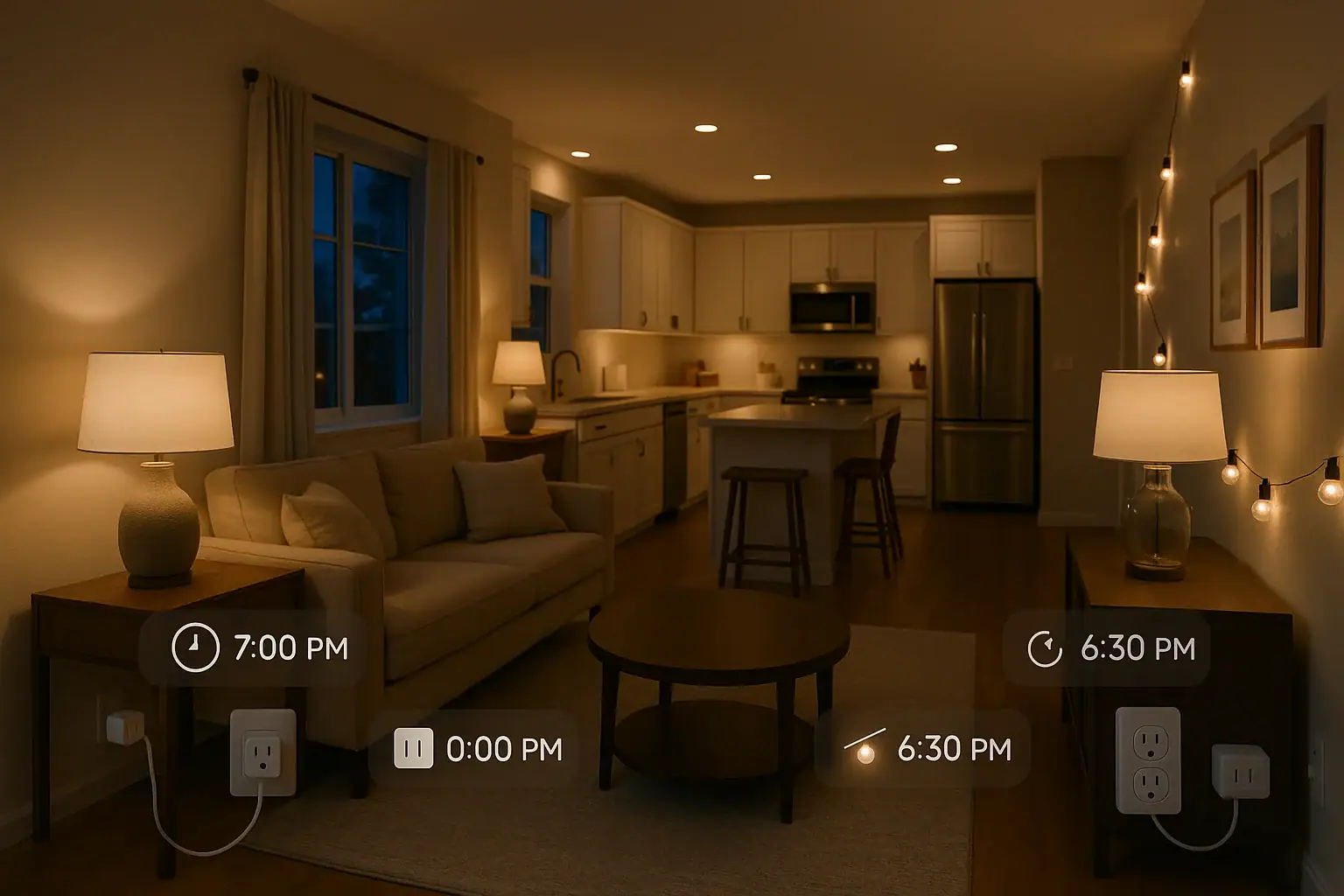
Smart plugs are one of the easiest ways to dip into home automation. They turn ordinary lamps and appliances into connected devices you can control and schedule from your phone or voice assistant. But once the novelty of turning things on and off remotely wears off, many people wonder what to actually do with them. This guide walks through practical, everyday smart plug scheduling ideas that are genuinely useful for comfort, safety, and savings in a typical US home.
Below you will find simple schedules you can set up in minutes, plus tips to keep them safe and energy efficient. You do not need a complex system to benefit. Even a few well-planned schedules can make your home feel more comfortable, secure, and organized. Use these ideas as a starting point and adapt the times and routines to match your own lifestyle.
Getting Started: Safe and Smart Use of Plug Schedules
Before you begin creating schedules, it is important to think about safety and practicality. A smart plug is still a regular outlet at heart, so you need to use it within its limits and in a way that fits your household routine.
Know what should and should not be on a smart plug
Some devices are perfect for scheduled control, while others are better left on a traditional switch.
- Good candidates: lamps, fans, coffee makers with mechanical switches, slow cookers, humidifiers, dehumidifiers, holiday lights, decorative lights, non-smart air purifiers, and small appliances that simply turn on when they get power.
- Use with extra caution: space heaters, irons, hair tools, and anything that gets very hot. Many safety experts recommend avoiding these on smart plugs altogether.
- Generally avoid: refrigerators, freezers, medical equipment, sump pumps, and anything that must run reliably without interruption.
Basic scheduling tips
Most smart plug apps offer similar options. Look for these features when you set up your schedules:
- Time-based schedules: Turn devices on or off at specific times of day.
- Sunrise/sunset schedules: Adjust automatically with changing daylight.
- Day-of-week control: Different schedules for weekdays and weekends.
- Timers: Run a device for a set duration, then turn it off.
- Away or vacation mode: Randomized on/off times to make your home look occupied.
Smart Plug Scheduling Ideas for Morning Routines
A well-planned morning schedule can make it easier to wake up, get ready, and leave the house on time. These ideas help you automate the first hour of your day.
Wake-up lighting that feels natural
Use a smart plug with a bedside lamp or floor lamp to create a gentle wake-up routine.
- Schedule the lamp to turn on 10–15 minutes before your alarm.
- In winter, set it to switch on just before sunrise so you are not getting ready in the dark.
- On weekends, use a later start time so you can sleep in.
This simple schedule can make early mornings feel less harsh and help your body adjust to a consistent wake-up time.
Automatic coffee or tea station
If your coffee maker or electric kettle turns on when it receives power (no digital start button required), a smart plug can handle your morning brew.
- Set your plug to turn on 10–20 minutes before you usually wake up.
- Prepare the coffee maker or kettle the night before so it is ready.
- Add a safety timer to switch it off after 30–60 minutes in case you forget.
Always test this setup on a weekend or day off first, and never leave water or coffee grounds sitting for more than a day.
Bathroom and closet lighting
For lamps or strip lights in bathrooms or closets without good natural light, create a simple morning schedule:
- Turn on lights at your usual wake-up time.
- Turn them off automatically after you typically leave for work or school.
This reduces fumbling for switches early in the morning and helps prevent lights from being left on all day.
Evening and Bedtime Smart Plug Routines
Evening schedules focus on winding down, improving comfort, and making sure your home is secure before bed.
Cozy evening lighting
Use smart plugs to create a relaxed atmosphere without thinking about switches.
- Schedule living room lamps to turn on at sunset or a fixed time like 6:00 p.m.
- Set them to turn off automatically at your usual bedtime.
- Use different times for weekdays and weekends if your schedule changes.
Bedside lamps and nightlights
Smart plugs can help with gentle lighting at night, especially for kids or anyone who gets up frequently.
- Turn on a dim lamp or nightlight at dusk.
- Schedule it to turn off after sunrise or at a set morning time.
- Use timers so lights do not stay on all night if they are only needed for falling asleep.
Automatic “goodnight” power-down
Many electronics draw power even when they are off. A simple bedtime schedule can cut this waste and reduce clutter from standby lights.
- Plug non-essential devices like game consoles, speakers, and decorative lights into a smart plug or power strip (rated for the load).
- Schedule the plug to turn off at your usual bedtime, such as 11:00 p.m.
- Turn it back on in the morning or late afternoon when you typically use those devices.
Do not include devices that need to stay connected, such as internet routers or equipment that runs overnight backups or recordings.
Energy-Saving Smart Plug Schedules
Smart plugs can help you use less energy without constantly thinking about it. The key is to target devices that do not need to run all the time.
Fans and portable air conditioners
In many parts of the US, fans and portable cooling units are used only during certain hours. Smart scheduling can keep rooms comfortable while avoiding wasted runtime.
- Schedule fans to turn on just before bedtime and off in the early morning when temperatures drop.
- For a home office, set a fan to run only during your work hours.
- Use timers to shut off portable cooling units after a few hours instead of running all night.
Humidifiers and dehumidifiers
These devices are often left on longer than needed. Smart plug schedules can keep humidity in check without constant operation.
- Run a bedroom humidifier from one hour before bedtime until an hour after you wake up.
- Schedule a basement dehumidifier during daytime hours when noise is less of an issue.
- Use shorter cycles spread through the day instead of running nonstop.
Check manufacturer guidance to make sure cycling the power on and off will not harm the device.
Standby electronics and chargers
Many small devices draw power even when they are not actively in use. While each one may use only a little, they add up over time.
- Create a “charging station” on a smart plug for phones, tablets, and small devices.
- Schedule the plug to turn on in the evening and off in the early morning once everything is charged.
- Use a smart plug for rarely used electronics so they only receive power when you need them.
Home Safety and Security Scheduling Ideas
Smart plugs can support a safer home by making it look occupied and by controlling lights and devices that help you move around safely at night.
Vacation and away-from-home lighting
When you are away, a dark house every night can signal that no one is home. Smart plug schedules can help create a more natural pattern of activity.
- Set living room and bedroom lamps to turn on around sunset and off at different times in the evening.
- Use randomized or “away” modes if your app offers them, so lights do not follow the exact same pattern every day.
- Keep at least one lamp on a schedule even when you are home, so your house looks similar whether you are there or not.
Entryway and exterior lighting
Good lighting around doors and walkways reduces tripping hazards and can deter unwanted visitors.
- Use smart plugs for plug-in porch or patio lights.
- Schedule them to turn on at sunset and off at a set time, such as midnight.
- Adjust for seasons using sunrise/sunset settings so you do not have to change the schedule every month.
Night safety lighting
For hallways, stairways, and bathrooms, scheduled lighting can make nighttime movement safer.
- Set small lamps or nightlights to turn on at dusk and off at sunrise.
- In multi-level homes, place a plug-in lamp near stairs and keep it on a nightly schedule.
- Use low-wattage bulbs to keep energy use modest while still improving visibility.
Smart Plug Schedules for Families and Daily Routines
Smart plug automation can also support family routines, homework time, and healthy habits. The goal is to reduce friction and help everyone stay on track.
Homework and study time
If you want to encourage focused study time, use smart plugs to control distractions and create a consistent environment.
- Schedule desk lamps in a study area to turn on at a set homework time each weekday.
- Use another plug to turn off gaming systems or entertainment devices during that window.
- Turn everything back on after the study period ends.
Screen-free family time
Smart plugs can help enforce “unplugged” hours without arguments over who forgot to turn something off.
- Choose a daily window, such as dinner time, when you want fewer screens.
- Schedule living room entertainment devices to turn off during that time.
- Pair this with lamps or music on a separate schedule to create a pleasant atmosphere.
Kid-friendly wake-up and wind-down
For younger children, lighting cues can make routines easier to follow.
- Use a lamp on a smart plug as a “time to get up” signal, turning on at an approved wake-up time.
- Turn on a soft lamp or nightlight 30 minutes before bedtime to signal wind-down time.
- Turn off bright overhead lights automatically at bedtime to encourage sleep.
Seasonal and Special-Use Smart Plug Ideas
Some of the most satisfying smart plug schedules are seasonal. They help you enjoy decorations and seasonal comfort without constant manual switching.
Holiday and decorative lighting
Holiday lights are a classic use for smart plugs, indoors and outdoors.
- Schedule indoor string lights to turn on at sunset and off at bedtime.
- For outdoor decorations, set earlier shutoff times to avoid overnight glare for neighbors.
- Use separate schedules for weekdays and weekends if you stay up later on certain nights.
Seasonal comfort devices
Depending on your climate, you may use certain devices only during part of the year.
- In winter, schedule electric blankets or heated mattress pads to pre-warm a bed for 30–60 minutes before bedtime, then shut off for safety.
- In summer, schedule window fans to pull in cool air in the late evening and shut off by early morning.
- For allergy season, run an air purifier during peak pollen times and reduce runtime at night.
Safety Checks and Best Practices for Smart Plug Schedules
While smart plugs are convenient, they still involve electricity and potentially heat-producing devices. A few best practices help keep your home safe.
Match the plug to the device
- Check the maximum load rating of your smart plug and compare it to the device you are plugging in.
- Avoid daisy-chaining multiple power strips or high-draw devices into one plug.
- Use only indoor-rated plugs inside and outdoor-rated plugs outside.
Be careful with heat-producing appliances
Many safety organizations recommend avoiding smart plug control of devices that get very hot, such as space heaters, irons, and hair tools.
- If you choose to automate any heat-producing device, never run it unattended.
- Use short timers instead of long schedules.
- Regularly inspect cords and plugs for wear or damage.
Test new schedules during the day
When you set up a new schedule, test it while you are home and awake.
- Verify that the device behaves as expected when power is turned on and off.
- Confirm that automatic shutoff times work correctly.
- Adjust times based on your real routine after a few days of use.
Bringing It All Together
You do not need dozens of complex automations to benefit from smart plugs. Start with a few schedules that clearly solve real problems for you, such as forgetting to turn off lights, struggling with dark mornings, or wanting your home to look occupied while you are away.
As you get comfortable, you can layer in more ideas: energy-saving schedules for fans and humidifiers, family routines for homework and screen-free time, and seasonal lighting that runs itself. Over time, your smart plug schedules can become a quiet background system that supports a safer, more comfortable, and more efficient home.
If you want to explore additional smart home and safety tips, you can continue learning about connected devices, sensors, and simple automations that build on the smart plug ideas you have already put in place.
 Smart Lock Battery Dead? How to Create a Reliable Backup Access Plan
 Smart Smoke Alarm vs Standard Smoke Alarm: Which Is Better for Your Home?
 Smart Thermostat Vacation Mode Settings: A Complete Homeowner Guide